Friday, July 25, 2008

e-learning reading group?

It has been suggested that we try an e-learning reading group - a monthly get together over lunch to discuss a particular article or book relating to e-learning. We’re thinking about starting sometime in October. What do you think? Would you attend? Any suggestions for readings?

Labels: ,

Friday, July 18, 2008

Blackboard - the future

Blackboard inc have released some video presentations about their Project NG (Next Generation) this is the hybred product that includes the final best of breed integration of WebCT and Blackboard into a single product. The presentation is not yet complete and more will be released as it becomes available. Nor is there as yet any formal release date - though at the BBWorld Europe confernence in Manchester Michael Chasen CEO suggested that it would in fact be version 10 sometime around end of 2009 early 2010 with some of the changes hitting version 9 early in 2009.

If you can bear the american hype as the presenter gets "really excited..." about every feature, it is worth a look as it illustrates the new drag and drop structure along with the context sensitive menus for course editing. You can view the presentation here it is an improvement on

Labels: , , , ,

Going Global, Going Public

Dean Shareski an Educational Technologist and advocate of the educational benefits of on-line sharing (See: Lesson #1: Share), has posted another pod- and slide cast in which he discusses some issues around being on-line, dispels some myths and considers the advantages of sharing. The presentation has a primary school perspective, but many of the pros-and-cons of educational web use which apply to primary and junior school children also apply to University students, so Dean's thoughts are no-less instructive and thought provoking for that.

The big take away for me, and the reason for this post, is that the traces you leave in the web when you start to develop an on-line presence don't vanish very quickly! Dean's suggestion in slide 8 that you should Google yourself is really instructive! This is what Google [thinks it] knows about me ... what does it know about you?


The original source of the embedded presentation is Podcast #40 of Thoughts from an EdTech. More about "Going Global, Going Public", posted with vodpod.


Labels: , ,

Tuesday, July 15, 2008

The sweet spot in education

Martin Weller (from the Open University) has republished his presentation from a JISC Emerge conference on SlideShare and released it in a blog post entitled "Finding the Sweetspot Between Web 2 and Education". The Sweet spot may actually be somewhere between formal instititutional e-learning systems and informal social networks and may have a lot to do with peer support and the gift economy.

Examples given include

  • two OU Facebook Applications (the first Course Profiles builds communities around OU courses, and the second, My OU Story, is aimed at building peer support networks for students)
  • SocialLearn a social network for the Open University and a platform for developing new types and models of learning
  • The EduPunk movement, and the video gifted to the community by Martin and mentioned in this august blog here.
  • and Twitter
A very interesting presentation with lots of food for thought!


more about "The sweet spot in education", posted with vodpod

Labels: , , , , ,

Friday, July 04, 2008

Windows Live Writer

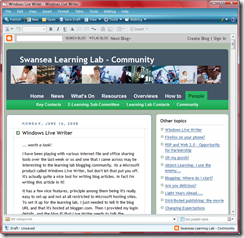
The Windows Live Writer in action. Web View for the Leaning Lab Community Blog.

I was writing a fairly positive review of Windows Live Writer, a new blogging tool from Microsoft, when it crashed on me before I could publish the article! Nonetheless, I was still sufficiently impressed to persevere.

The good news is that Live Writer does most things that you'd expect a capable word processor to do including spell checking (but no grammar check). It has the extra bits and pieces that all bloggers need including image, video and map embedding. It also has more advanced features that are nice but are often not provided, principally a WYSIWYG table editor that outputs valid HTML with a GUI that will be familiar to all word users. Other nice features include categories and tags.

Live Writer has 4 modes:

  • a normal mode
  • an HTML editing mode
  • a WYSIWYG editing mode and
  • a web preview mode (pictured)

The first two of these are essentially the same as Blogger's browser interface. Interestingly it download's style information from the live blogging site to provide good fidelity for the last two modes.

It is easy to set up, providing built-in support for Windows Live Spaces and Share Point blogs as well as interfaces to Blogger, WordPress, and Moveable Type blogs (among others). To set it up to post to the Learning Lab Blog in order to compose and post this entry, I needed the blog URL, account credentials and the blog id. After this, the Writer downloaded the style information needed for WYSYWYG editing and preview. I also tried to link it to my WordPress blog at blog.swan.ac.uk but for that I needed the URL for the publishing API which I couldn't discover (perhaps a friendly sysadmin will provide it in the comments).

The one feature that isn't turned on by default is auto save (although drafts can be saved locally on the desktop). However, you can turn this on from the options! Given my experience, I'd recommend this!

Labels: ,